Clip Snip to tray. Drag anywhere.
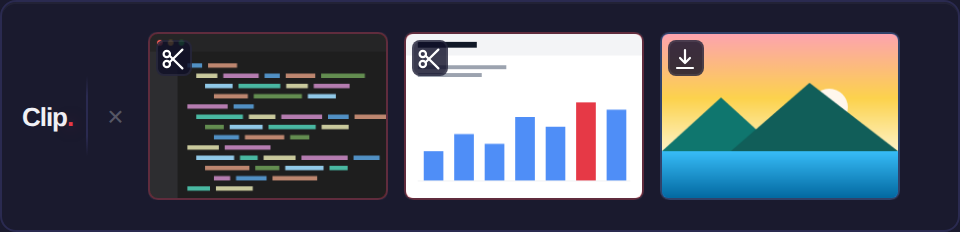
Every screenshot and download you save disappears into a folder. Clip catches it first - floating it in a tray above your taskbar so you can drag it straight into Outlook, Teams, VS Code or a browser upload in under 3 seconds.
How it works
Three seconds, three steps.
Snip or save
Take a screenshot with Win+Shift+S, or download a file. Clip watches your Screenshots and Downloads folders and spots it instantly.
It floats in the tray
A thumbnail appears in a slim tray above your taskbar - red badge for screenshots, blue for downloads. The tray auto-hides when you're done.
Drag it anywhere
Drag the thumbnail into any app as a real file drop - or single-click to copy it to the clipboard. Done. No File Explorer involved.
Features
Small app. Sharp edges filed off.
Everything below ships in Clip today - nothing here is roadmap.
Native drag-and-drop
Thumbnails drag as real OS-level files, so the receiving app gets a genuine file drop - not a clipboard paste that half your tools reject. Works with VS Code, Outlook, Teams, Slack and browser upload fields.
Two watchers, one tray
Screenshots and Downloads are watched simultaneously, each with its own badge colour. Installers, archives and in-progress downloads are filtered out automatically. Toggle either watcher from the tray icon.
Click to copy
Single-click copies images as image data and other files as real file objects - ready to paste wherever you are.
Stays out of your way
The tray appears when a file lands and auto-hides on your schedule - 30 seconds, 1 minute, 2 minutes, or never. It always shows without taking focus, so it can't swallow a keystroke while you're typing.
Theme-aware tray icon
Light or dark taskbar, Clip's icon matches - and swaps live when you change your Windows colour scheme.
Right-click for the rest
Open the file in its default app, copy its path, or reveal it in Explorer - a three-option context menu covers the occasional cases without cluttering the everyday one.
Summon it from anywhere
Press Ctrl+Shift+Space to bring the tray up - or send it away - from inside any app, without reaching for the mouse. On by default; turn it off from the tray menu.
Pin the one you keep reaching for
Right-click a thumbnail to pin it. Pinned shots stay put while everything newer flows past, so the reference you keep coming back to is always one drag away.
Point it at your folders
Watch any folder you like, not just the defaults - repoint Screenshots or Downloads from the tray menu. Show 3, 4 or 5 thumbnails to taste. And if Clip is ever watching a different folder from where Windows saves screenshots, it tells you exactly where to point your capture tool.
Every monitor, one drag
Drag the tray to whichever screen you're working on - it moves freely across all of them and stays clear of the taskbar. Double-click the label to snap it home.
Private by architecture
Clip has no cloud sync, no account, and no network activity of any kind. Your screenshots never leave your machine - there is simply no code path for them to.
Pricing
Pay once. Own it.
Half price for launch until 31 August, then full price from 1 September. Buy once, updates free for v1. No subscription. Every tier includes every feature - the only difference is how many devices your licence covers. Purchases are handled securely by Lemon Squeezy.
Half price for launch until 31 Aug (standard £14.99). One-time. 1 device. Full price from 1 Sep.
Half price for launch until 31 Aug (standard £22.99). One-time. 2 devices - desktop and laptop, one licence. Full price from 1 Sep.
Half price for launch until 31 Aug (standard £29.99). One-time. 3 devices, for people whose whole desk runs on Windows. Full price from 1 Sep.
Requires Windows 10 or 11. Installer delivered by Lemon Squeezy after purchase.