Beam Your phone and your PC, finally talking.
The photo is on your phone. You need it on your PC. Today that means emailing it to yourself, hunting for a cable, or waiting on a cloud sync. Beam replaces all of it: scan a QR code, pick your files, and they land on your desktop over your own Wi-Fi.
How it works
Scan. Pick. Landed.
Beam runs a private server on your PC that only your own network can see. Your phone needs nothing installed - its camera and browser already speak Beam's language.
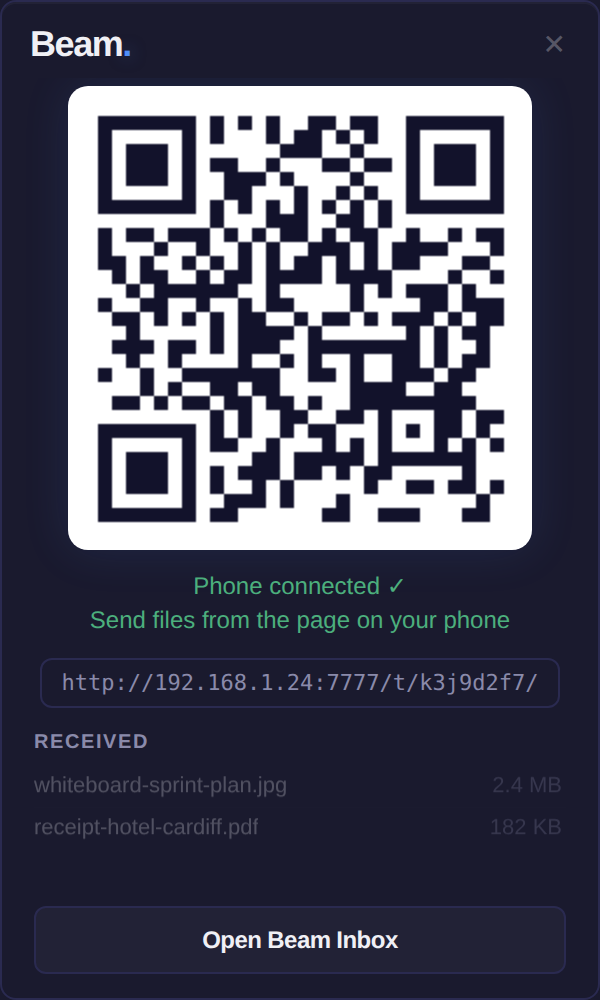
Scan the QR code
Beam shows a QR code in a small window on your desktop. Point your phone camera at it - no app to download, no pairing ritual.
Pick your files
Your phone opens a simple upload page served by your own PC. Choose photos, documents, whatever you need to move.
They land in the Beam Inbox
Files arrive in a Beam Inbox folder on your desktop in seconds, with the most recent transfers listed right in Beam's window. One click opens the Inbox.
Why local Wi-Fi
Your photos shouldn't commute via a data centre.
Traffic never leaves your network
Sending a photo to a PC one metre away shouldn't involve the internet. Beam's transfer happens entirely over your own Wi-Fi - nothing is uploaded to anyone's server, including ours.
Nothing to install on your phone
Beam works with the camera and browser your phone already has - iPhone or Android. No companion app, no account to create, no permissions to grant beyond picking the files.
Part of the Tray suite
Beam is the second app in Tray, alongside Clip. Same principles, same look, same one-time pricing model - small tools that live in your system tray and solve one friction each, properly.
Honest status: in development
Beam is being built at BitSoft right now. We don't promise ship dates - we ship when it's right. The waitlist is the single place we'll announce it first.
Be first
Hear about Beam before anyone else.
One email when Beam ships, and the occasional build update before that. No spam - we hate inbox friction as much as file friction.